
AI Agents in Your Infrastructure: What We Let Them Touch
AI agents can read logs, write Terraform and open pull requests. Here is where we draw the line in production: read freely, propose everything, apply only through a human.
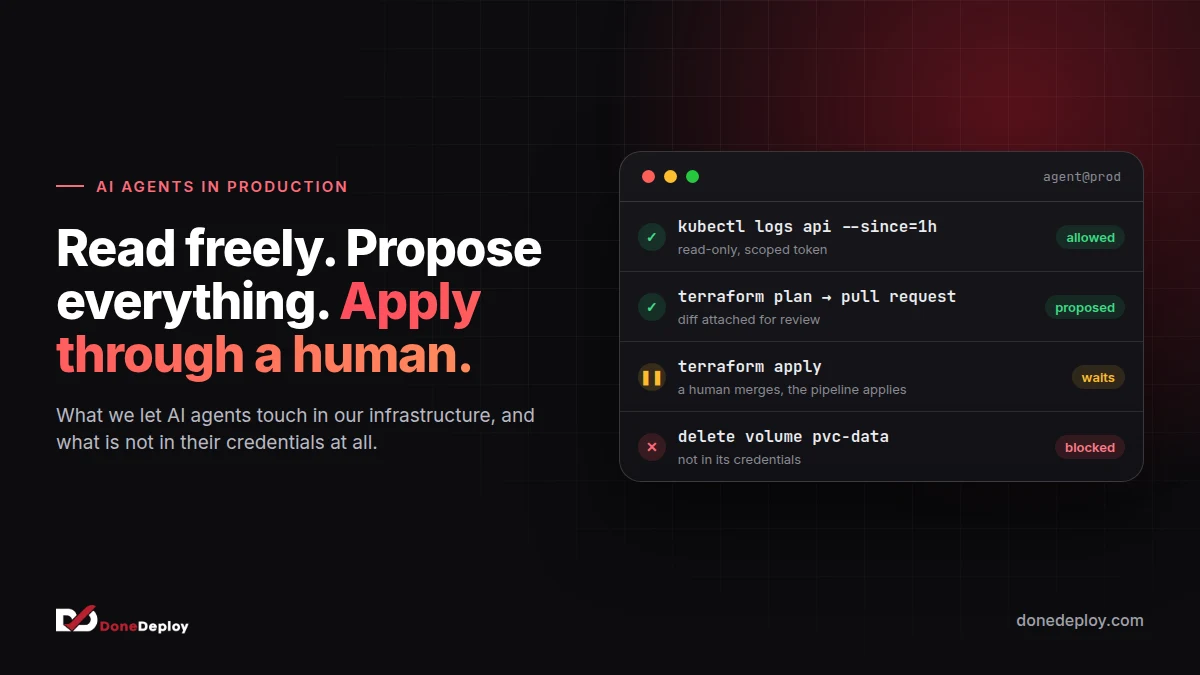
Every team we talk to is asking the same question this year: should an AI agent be allowed near production? The honest answer is yes, and it is already useful there. The more useful question is what exactly it may do, and who signs off on the rest.
We use agents every day to run infrastructure, for ourselves and for clients. They read logs at 3 a.m., write Terraform, open pull requests and explain a failing deploy faster than any of us can. They have also, in testing, confidently proposed deleting the wrong thing. Both are true, and the setup has to be built for both.
Here is the rule we work by, and why.
Read freely, propose everything, apply through a human
That sentence is the whole policy. The rest of this post is detail.
| What the agent does | Allowed | How |
|---|---|---|
| Read logs, metrics, traces, events | Always | Read-only credentials, scoped to the environment |
| Describe cluster and cloud state | Always | get, describe, list, never edit |
| Write code, Terraform, Helm values | Always | In a branch, as a pull request |
Run terraform plan, dry runs, diffs |
Always | In CI, output attached to the PR |
| Restart a pod, scale a deployment | With a runbook | Named actions only, logged, reversible |
| Apply changes to production | Never on its own | A human merges; the pipeline applies |
| Delete data, volumes, accounts, DNS | Never | Not in its credentials at all |
The last row matters most. A rule that says “the agent should not delete volumes” is a wish. A credential that cannot delete volumes is a control.
Why reading is cheap and writing is not
Most of the value of an agent in operations comes from reading. Pulling the last hour of logs from four services, lining them up against a deploy and saying “this started when the config map changed” is exactly the work that eats an engineer’s evening. It needs broad read access and no write access at all.
Writing is different because mistakes compound. A model that misreads one log line writes a wrong summary; you notice and move on. A model that misreads one log line and then acts on it can turn a small incident into a large one. So we split the two on purpose: wide reach for reading, a narrow, explicit door for acting.
The pull request is the safety boundary
We do not build a special approval system for agents. We reuse the one that already works for people: the pull request.
An agent that wants to change infrastructure does what a new engineer would do. It writes the change in a branch, CI runs the plan, the diff and the tests, and a person reviews it. If it is approved, the normal pipeline applies it with the normal pipeline’s credentials.
This gives you several things for free:
- An audit trail. Every change has an author, a reason and a review.
- A rollback. Reverting a commit is a known, practised operation.
- The same policy for humans and machines. Nobody gets a shortcut, including the agent.
The agent’s own credentials never include the right to apply. They can push a branch and open a PR. That is all.
Runbooks, not root
Some actions are worth automating end to end: restarting a stuck worker, scaling up a queue consumer, rotating a node out of the pool. For those we give the agent named actions, not shell access. Each one is a small, tested script with fixed arguments, a limit (one restart per service per ten minutes, for example) and a log line every time it runs.
If an agent wants to do something that is not on the list, the answer is a pull request that adds it to the list. That conversation is where the team decides how much it trusts the automation, in writing, rather than in someone’s terminal history.
Blast radius is a design choice
Before giving an agent any access, we ask one question: if this goes wrong at the worst possible moment, what breaks? Then we shrink that answer until we are comfortable with it.
- Separate credentials per environment. The agent working on staging cannot see production secrets.
- Short-lived tokens. Issued per task, expiring in minutes, not a key in a config file.
- Namespaces and accounts as walls. An agent scoped to one namespace or one cloud account cannot wander.
- No secrets in context. The agent sees that a secret exists, not its value. Prompts and transcripts are logs, and logs leak.
- Rate limits on actions. A loop that restarts the same service fifty times is a bug, not a fix.
What changes for the team
The surprise for most teams is that the agent is not the hard part. The hard part is that these rules expose gaps that were already there. If you cannot say which credentials can delete a production database, that was a problem before any AI arrived. Agents simply make it urgent.
Done well, the result is a team that spends less time on toil and more time reviewing well-described changes. On-call gets quieter because the first fifteen minutes of every incident (find the logs, find the deploy, find the diff) are already done when a person opens the page.
Where to start
If you are adding agents to your operations, start small and boring:
- Give an agent read-only access to logs and metrics in one environment, and let it summarise incidents.
- Let it open pull requests for routine changes: version bumps, resource limits, alert thresholds.
- Write down the first three named actions you would trust it with, and build those as scripts.
- Review its credentials the way you would review a new contractor’s.
Agents are excellent operators when the system around them assumes they will sometimes be wrong. Build that system first, and the agent becomes the colleague who never minds the 3 a.m. page.
If you want help setting up AI agents safely in your own infrastructure, book a free call and we will walk through your setup with you.
Related articles
 CI/CD for Models and PromptsEvaluation gates, model registries, canary releases and rollback: applying CI/CD discipline to prompts and models in LLM applications.
 Automating Business Workflows with AI, SafelyWhere AI fits in business process automation, and how human review, guardrails and audit trails keep automated workflows safe.
 GPU Nodes on Kubernetes Without Wasting MoneyNode pools, MIG, time-slicing, scale to zero and spot instances: practical ways to keep Kubernetes GPU costs under control for AI workloads.